
A hardware-first push for voice on Switch 2
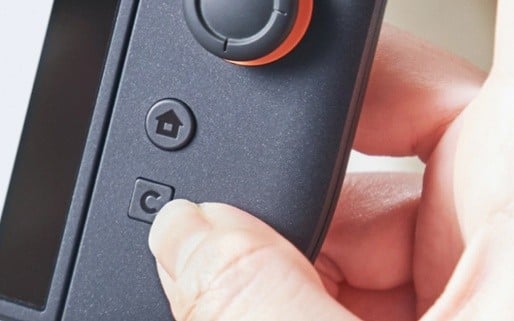
Nintendo’s second‑generation Switch introduces a ‘C’ button on the Joy‑Con to launch GameChat, positioning live conversation as a first‑class system feature rather than an optional layer. Nintendo describes it as a “dedicated button” intended to keep initiation simple so that starting a conversation takes only a “single action”. In effect, the console now bakes voice into the controller in the same way as A and B have long defined core input. The ‘C’ mark nods to “chat”, “communication” and “conversation”, and was chosen to harmonise with the “existing A and B button layout”. For readers who want the design context straight from Nintendo, see the company’s official description of the feature.

Access and pricing: what changes this month
GameChat use is tied to an active Switch Online membership, with a temporary waiver under a “GameChat Welcome Offer”. Through March 31, 2026, GameChat features can be used for free, a window that effectively serves as a public beta at platform scale. For households and regulators watching how voice is rolled out to younger players, that timing matters: after the offer expires, access will sit behind Nintendo’s subscription gate. Details on membership tiers and regions are available on the Switch Online subscription site.
- Now-March 31, 2026: the “GameChat Welcome Offer” waives the membership requirement for GameChat features, allowing any Switch 2 owner to test the service.
- After March 31, 2026: GameChat features are expected to align with the standard requirement for an active Switch Online subscription, introducing an ongoing cost for regular use.
What the C button changes in everyday play
The C button is not just a new glyph on the Joy‑Con; it subtly rewires how and when players speak to each other.
- Lower friction: a “dedicated button” reduces the steps between deciding to speak and being heard, which is especially helpful during fast gameplay and short handheld sessions.
- Standardised entry point: friends, family members, and newcomers share the same physical starting place for voice, improving discoverability and making remote troubleshooting easier.
- Clear social signalling: the ‘C’ label communicates intent without new terminology, sitting logically with the “existing A and B button layout” and reinforcing that talking is now part of the default control scheme.
- Console‑level emphasis: the hardware route prioritizes on‑device initiation of GameChat over the companion‑app workarounds that shaped the last generation, narrowing the gap with rival home consoles.
Security and compliance considerations for a family platform
By making voice a one‑tap experience, Nintendo also steps closer to regulatory expectations around child safety and data protection. This is no longer a niche feature used by a subset of competitive players; it is a default path for children to be heard online.
- Child privacy: in the United States, the Children’s Online Privacy Protection Act (COPPA) requires verifiable parental consent for users under 13 when collecting voice or other personal data; regulators have treated real‑time voice as in-scope for years. The UK’s Age Appropriate Design Code sets similar expectations for services likely to be accessed by children, emphasising high‑privacy defaults and data minimisation.
- Data protection: in the European Union, the General Data Protection Regulation treats voice as personal data, and potentially biometric data if it is processed for identification. Platforms offering GameChat at scale will need to minimise collection, clearly state retention periods, and provide accessible controls to delete or restrict use.
- Safety tooling: for families, the most tangible protections will be easy mute/block functions, session‑level reporting, invite controls, and options to limit chat to friends or vetted parties – ideally surfaced in the same flow as enabling GameChat for the first time.
- Parental oversight: system‑wide settings should allow guardians to disable GameChat per user, restrict who can be contacted, and receive notifications of changes, aligning with regulators’ push for proactive, not reactive, parental tools.
- Abuse prevention: standardised reporting workflows and in‑game UI prompts help surface issues quickly across titles, allowing platform‑level enforcement rather than pushing every dispute back onto individual developers.
Technical notes that matter for reliability
For GameChat to feel as natural as pressing A, the underlying stack has to be as robust as Nintendo’s input and matchmaking systems.
- Single‑action initiation: routing microphone capture from a hardware “dedicated button” can reduce UI latency and missed presses during play, especially in handheld mode where players glance at the screen less frequently.
- Network resilience: voice requires stable low‑latency paths; congestion control, jitter buffers, and echo cancellation are critical on handheld Wi‑Fi and shared home networks, particularly in regions where broadband quality is uneven.
- Privacy by design: defaulting to push‑to‑talk or clear on‑screen indicators when microphones are active reduces accidental capture and supports compliance narratives about informed user choice.
- Cross‑title consistency: a system layer for invites, presence, and permissions helps developers avoid reinventing safety and audio pipelines, and gives regulators and consumer‑protection bodies a single place to assess Nintendo’s controls.
How Switch 2’s approach compares with rivals
In competitive terms, Nintendo is late to native voice, but the C button now gives the Switch ecosystem a dedicated hardware affordance that Sony and Microsoft have so far avoided on their standard controllers. That choice will be closely watched by policymakers who increasingly weigh design decisions when assessing youth‑oriented platforms.
| Platform | Dedicated chat button on controller | System‑integrated party/voice chat | Subscription required for voice chat |
|---|---|---|---|
| Nintendo Switch 2 | Yes (C button) | Yes (GameChat) | Yes (Switch Online); waived via “GameChat Welcome Offer” through March 31, 2026 |
| PlayStation 5 | No | Yes | No |
| Xbox Series X|S | No | Yes | No |
Practical setup tips for households and shared devices
For parents, carers, and schools that treat the Switch 2 as shared infrastructure, the shift to one‑tap voice is an opportunity to reset how the console is configured from day one.
- Create per‑user profiles and apply age‑appropriate chat permissions before first use, rather than relying on default system behaviour.
- Test microphones and privacy settings in a quiet environment so the first live session isn’t a troubleshooting session, and so younger players see adults modelling how to use mute and reporting tools.
- Use friends‑only chat while younger players build their approved contact lists, revisiting those lists periodically as school and social circles change.
- Favour wired headsets or low‑latency wireless options to avoid audio lag in competitive titles, which can otherwise nudge players back to third‑party apps that sit outside Nintendo’s safety tooling.
Developer implications as GameChat scales
As GameChat becomes the default layer for voice on Switch 2, studios face both new obligations and new opportunities to simplify their own multiplayer stacks.
- Respect system permissions: honour per‑user chat restrictions and indicate when a user cannot transmit, so minors and muted players are not prompted to override platform‑level safeguards.
- Surface clear status: show when a player is connected to party chat versus in‑game proximity chat to prevent duplicate audio and confusion, especially in cross‑platform titles.
- Align reporting: route abuse reports to the system layer so actions apply across titles and sessions, giving Nintendo and regulators clearer visibility into patterns of harm.
- Optimise for handheld: design UX that works with brief “single action” interactions rather than deep menu trees, acknowledging that many players will use GameChat on the move, on battery, and on variable networks.
Related reading
