

The evolution of mobile interface design is increasingly shifting toward depth and dimensionality. With the rollout of iOS 26, Apple has expanded its personalization framework to include 3D spatial wallpapers, moving beyond static imagery to create a more immersive lock screen experience for hundreds of millions of users.
This feature transforms standard two-dimensional photographs into dynamic scenes that respond to the physical orientation of the device. By leveraging the iPhone’s internal sensors and on-device machine learning, the system creates a parallax effect that mimics real-world depth while keeping personal imagery processed locally rather than in the cloud.
The Mechanics of Depth Mapping and Spatial Rendering
The 3D spatial effect is not a simple animation but the result of sophisticated computational photography. When a user selects a photo for a spatial scene, the system employs a depth-estimation model-processed via the Neural Engine-to analyze the image and generate a depth map that can be re-rendered in real time as the phone moves.
This process involves several technical layers:
- Semantic Segmentation: The AI identifies the primary subject in the foreground and separates it from the background, allowing key people or objects to “float” independently of the scene behind them.
- Z-Axis Estimation: The system assigns a perceived distance to different elements within the 2D image to create a simulated third dimension, stacking layers that can shift relative to one another.
- Sensor Integration: The gyroscope and accelerometer track the device’s tilt in real time, shifting the foreground and background layers at different speeds to produce the 3D illusion without visible lag.
This technology is integrated across the ecosystem, appearing not only on the lock screen but also within the Photos app and specific Home Screen widgets, ensuring a consistent visual language across the OS and signaling how Apple expects third-party developers to treat depth and motion in future interface design.

Implementing Spatial Scenes on iPhone
Apple has streamlined the application of this effect, allowing it to work on a wide variety of user-generated content. As noted in the official release documentation, spatial scenes are designed to be a mainstream feature rather than a niche setting reserved for power users:
Spatial scenes let you add a new 3D effect to your photo wallpapers, bringing them to life when you move your iPhone.
While the system provides a curated list of suggested “Spatial Scenes” during the setup process, users can manually convert almost any photo in their library using the following workflow:
- Navigate to Settings ⇾ Wallpaper and select Add New Wallpaper.
- Select the Photos option in the top-left corner.
- Choose the desired image from the library, favoring photos with clear separation between subject and background for best results.
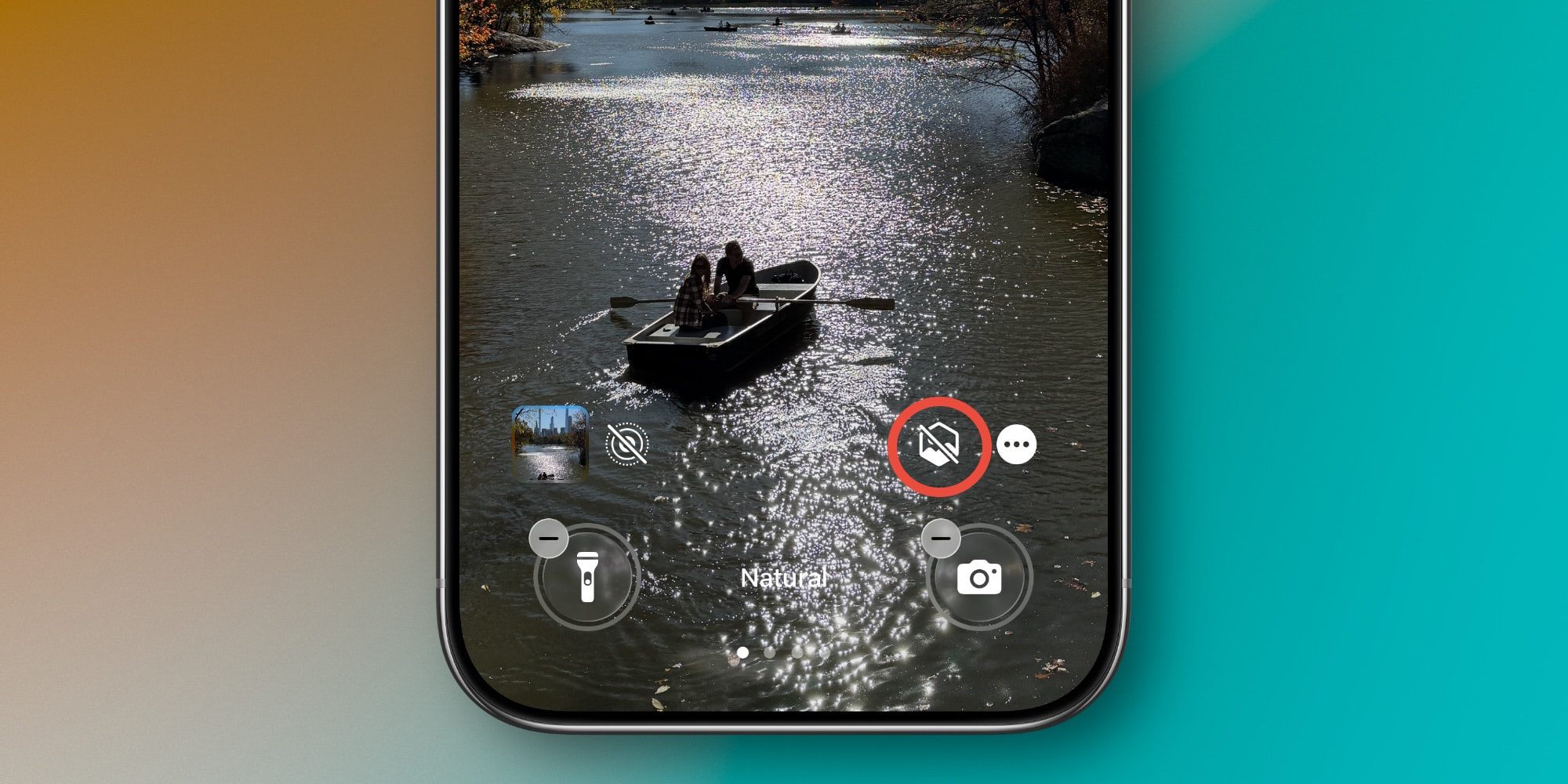
- Tap the geometric photo icon located near the lower-right section of the screen.
- Wait for the spatial scene to generate, then tilt the device to verify the 3D movement and adjust framing as needed.
- Tap Add to finalize the wallpaper and apply it to the Lock Screen, with the option to pair it to a specific Focus mode.
System Performance, Privacy, and Hardware Dependency
The seamless execution of spatial wallpapers depends heavily on the interplay between software optimization and hardware capability. Because the depth mapping occurs locally on the device to maintain user control over personal photos, the efficiency of the Apple Silicon chip determines how quickly the effect is rendered and how smooth the resulting motion appears.
| Component | Role in Spatial Wallpapers |
|---|---|
| Neural Engine | Handles real-time image segmentation and depth map generation. |
| Gyroscope | Detects precise angular velocity to trigger layer movement. |
| GPU | Renders the final composite image with parallax offsets. |
By utilizing Core ML frameworks, iOS 26 ensures that this visual enhancement does not significantly impact battery life or system latency, maintaining the balance between aesthetic customization and device performance. The decision to process these effects on-device also aligns with broader data-protection requirements in major markets, including obligations under frameworks such as the EU General Data Protection Regulation, which increasingly shape how large platforms architect everyday consumer features.
For policymakers and regulators watching the mobile ecosystem, 3D spatial wallpapers are a small but telling example of how interface design, AI acceleration, and privacy-by-design principles are converging-turning even seemingly playful visual effects into test cases for how personal data is handled at scale on modern smartphones.
Worth a look
